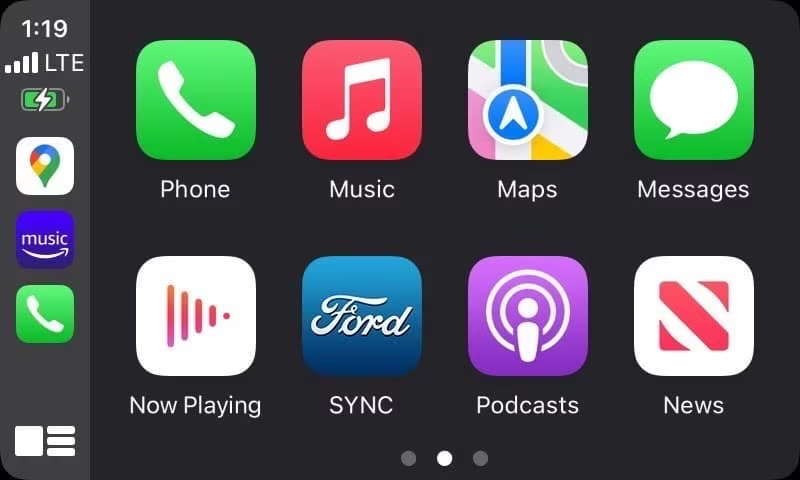
Wireless Apple CarPlay
Many vehicles are now offering Wireless Apple CarPlay for added convenience. As the name implies, with Wireless Apple CarPlay, your device will connect automatically via Bluetooth or in-car Wi-Fi without you worrying about plugging it in. Wireless Apple CarPlay also works great with the wireless charging pad feature found in many newer cars.
Starting with the 2021 model year, wireless CarPlay can be found on popular models such as the
Ford F-150, Chevy Silverado 1500,
Honda Accord,
Nissan Rogue, and
Dodge Durango.
Keep in mind, wireless CarPlay may not always be standard, so be sure to consult your local AutoNation USA location to confirm if the vehicle you are interested in offers Wireless Apple CarPlay.
How to Set Up Apple CarPlay
- Make sure that Siri is on, then start your car.
- To connect your iPhone to your car:
- With a USB cable: Plug your iPhone into the USB port in your car with an Apple Lightning to USB cable. The USB port might be labeled with a CarPlay icon or a smartphone icon.
- If your vehicle supports wired & wireless CarPlay: Plug your iPhone into the USB port in your car. You will receive an alert on your iPhone offering to connect you wirelessly on your next drive.
- If your vehicle only supports wireless CarPlay: Make sure that your stereo is in wireless or Bluetooth mode, then press and hold the voice command button on your steering wheel. Then on your iPhone, go to Settings > General > CarPlay, and select your car.
If you are still having difficulty setting up Apple CarPlay, be sure to check your vehicle owner's manual for any instructions specific to your vehicle.
How to Turn On/Off Apple CarPlay
To turn it on: Plug your iPhone into the USB port in your car. The USB port is sometimes labeled with a smartphone icon or a CarPlay icon. If your car supports wireless CarPlay, after the initial setup (see instructions above), Apple CarPlay should automatically turn on when you start your car going forward.
To turn it off: If you are connected to Apple CarPlay with a USB cable, unplug your device to disconnect from CarPlay. Alternatively, you can turn off CarPlay through the settings app on your iPhone. Go to Settings > General > CarPlay > tap on your vehicle from the list of paired vehicles > tap "Forget This Car."
Why Won't My Apple CarPlay Work?
If you are having trouble getting Apple CarPlay to work in your vehicle, there are a few things you can check:
- Make sure your car and country/region supports Apple CarPlay. If you're unsure if your car supports CarPlay, check your owner's manual or contact the vehicle manufacturer.
- Make sure that your iPhone has the latest version of iOS.
- If you have a wired connection, try connecting again with a different USB cable to a different USB port in your vehicle if you have one. If you have a wireless connection, ensure that Wi-Fi and Bluetooth have been enabled under Settings > Wi-Fi and Settings > Bluetooth.
- Try restarting your car and your iPhone, and make sure that Siri is on.
- Make sure that Apple CarPlay isn't restricted on your iPhone. Go to Settings > Screen Time > Content & Privacy Restrictions, tap Allowed Apps, and ensure that CarPlay is enabled.
- Try reconnecting your device to your car. Go to Settings > General > CarPlay, tap your car, then tap "Forget This Car". Then set up CarPlay again.
- Make sure that your CarPlay stereo uses the latest firmware from the car manufacturer. Check your car's manual for more information.
Apple Car Key
Beginning with select 2021 car models, you can unlock and start your car with your iPhone thanks to the Apple digital car key. You can even share your keys with friends or family. The Apple car key will even work for up to five hours after your iPhone battery runs out. Learn more about Apple car key compatible models.
Used Cars for Sale With Apple CarPlay
If you are searching for a used car, truck, or SUV with Apple CarPlay, you've come to the right place. AutoNation USA has a wide selection of used vehicles for sale around the country, many of which offer Apple CarPlay. Shop our current used cars for sale with Apple CarPlay.
If you have any questions, feel free to contact your local AutoNation USA location. Our friendly team members are here to answer any questions you may have about Apple CarPlay, Android Auto, or any other vehicle features.
How to Set Up Apple CarPlay by Brand